Before you go: 10 minutes of preparation
The best moment to solve a language problem is before you're standing in the restaurant. Four small steps make every meal easier.
- Get your allergy written in the local language. A short allergy card, ideally checked by a native speaker. Keep the paper in your wallet and a photo on your phone.
- Learn one word. The local word for your allergen — peanut, shellfish, milk or egg — is worth knowing by heart.
- Keep your medication on you. If your doctor prescribed emergency medication, carry it in your day bag, not in your suitcase.
- Build a food folder. In TapTalkie, save the icons you'll need into one folder for the trip — and add the photo of your allergy card to it.
Short on time? Use AI Smart Folders: tap + in Favourites, describe the situation — “ordering food” — and the app fills a folder with the right icons for you.
At the table: show, don't explain
Forget long sentences. Three beats are enough.
- Tap the icon. Common allergens have their own icons — peanut, shellfish, milk and eggs among them.
- Mark it. Open Draw and put a red cross over it. A crossed-out peanut means “no peanuts” almost everywhere.
- Show it. Turn the screen to the waiter and pinch to zoom so they can see it clearly. Then show the photo of your allergy card too.
 Peanut
 Shellfish
 Milk
Milk Eggs
Eggs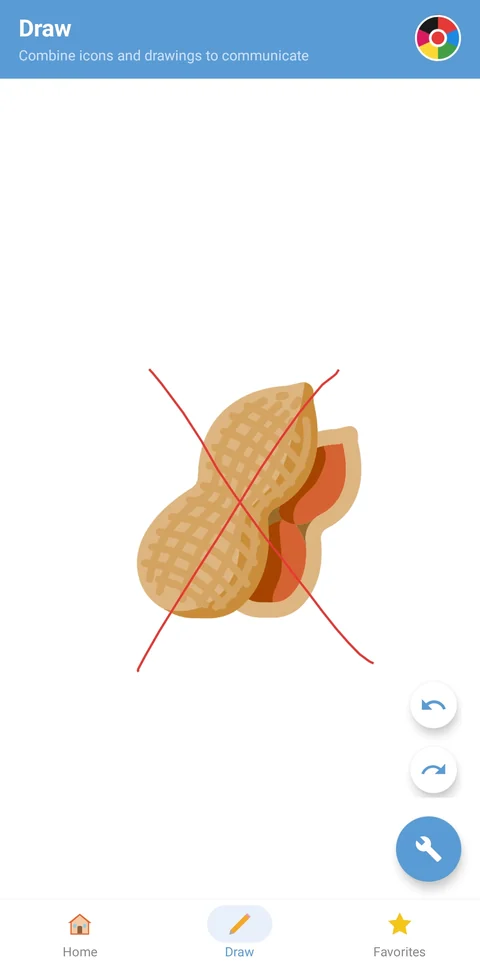
Vegetarian, or no pork? There's an icon for that
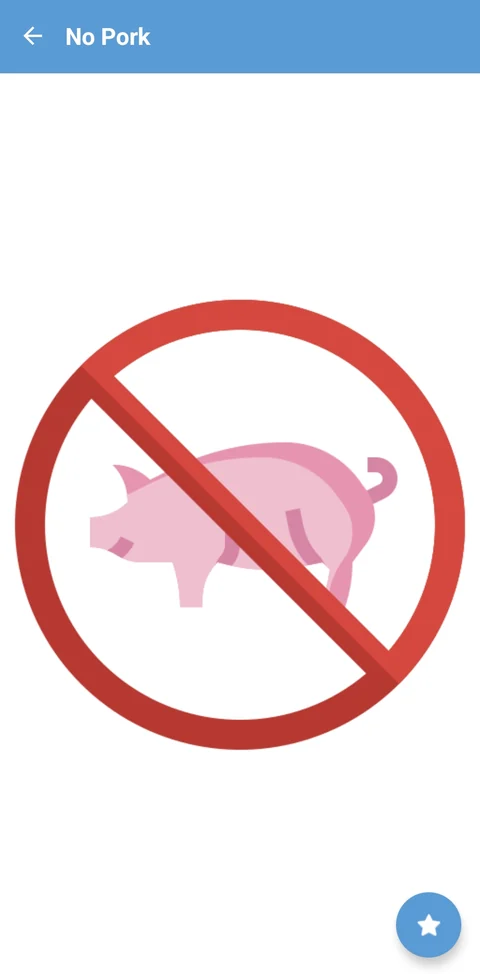
Some needs are so common they already have their own icons. In the Meat category you'll find No Meat, No Pork and No Beef — no drawing needed. Tap one and it fills the whole screen, easy to read from across the table.
Make sure they really understood
A smile isn't a yes. Take ten more seconds to be sure.
- Point, then point again. Point at the dish on the menu, then at your crossed-out icon. Wait for a clear nod — or a clear shake of the head.
- Ask about the hidden parts. Sauces, oils and seasoning are where allergens hide. The Dining category has icons for olive oil, soy sauce and seasoning — show them and ask.
- When in doubt, don't. If the answer isn't clear, choose something simpler — plain rice, grilled vegetables, fruit — and ask again.
An honest word. TapTalkie makes your message fast and unmistakable. For a severe allergy, it doesn't replace a written card in the local language or the medication your doctor prescribed. Use them together.
No Wi-Fi in the restaurant? No problem
Your icons, folders, photos and drawings live on your phone, so they work with no signal at all. AI-powered search — typing a phrase like “I need vegetarian food”, speaking or snapping a photo — needs a connection, so set up your food folder before you head out.
Frequently asked questions
Is there an allergy icon in TapTalkie?
There are icons for common allergens such as peanut, shellfish, milk and eggs. Use Draw to put a red cross over the food you can't eat — a crossed-out food is understood almost everywhere.
Can I show that I'm vegetarian or don't eat pork?
Yes. The Meat category has ready-made No Meat, No Pork and No Beef icons. Tap one and it fills the screen, so a waiter can read it from across the table.
Does it work without internet?
Yes. Icons, categories, favourites, your photos and drawing all work offline. AI-powered search — typing a phrase, using your voice or a photo — needs an internet connection.
Can I prepare everything before the trip?
Yes. Create a folder in Favourites for your trip, add the food icons you need and a photo of your written allergy card. Everything stays on your phone.
400+ universal travel icons in 26 categories — ready on your phone, even offline.

Every plan starts with a free 7-day trial. Cancel any time in Google Play.

